A retail POS that knows every size, colour and barcode.
Ring up a sale by scanning the tag or typing a SKU, attach the member for their price, and close the day with a cash count that matches the drawer.
Where a shop till lets you down
A customer brings the medium shirt to the counter, but the till only knows the shirt. The cashier picks the first price that comes up, the large is now short in the stock count, and nobody finds out until a customer asks for a large that is not there.
Then come the awkward moments: a regular expects the member price and the cashier has to work it out by hand, a refund is given in cash with no record of who approved it, and at closing the drawer is out by an amount nobody can explain.
How Timeo sells at the counter
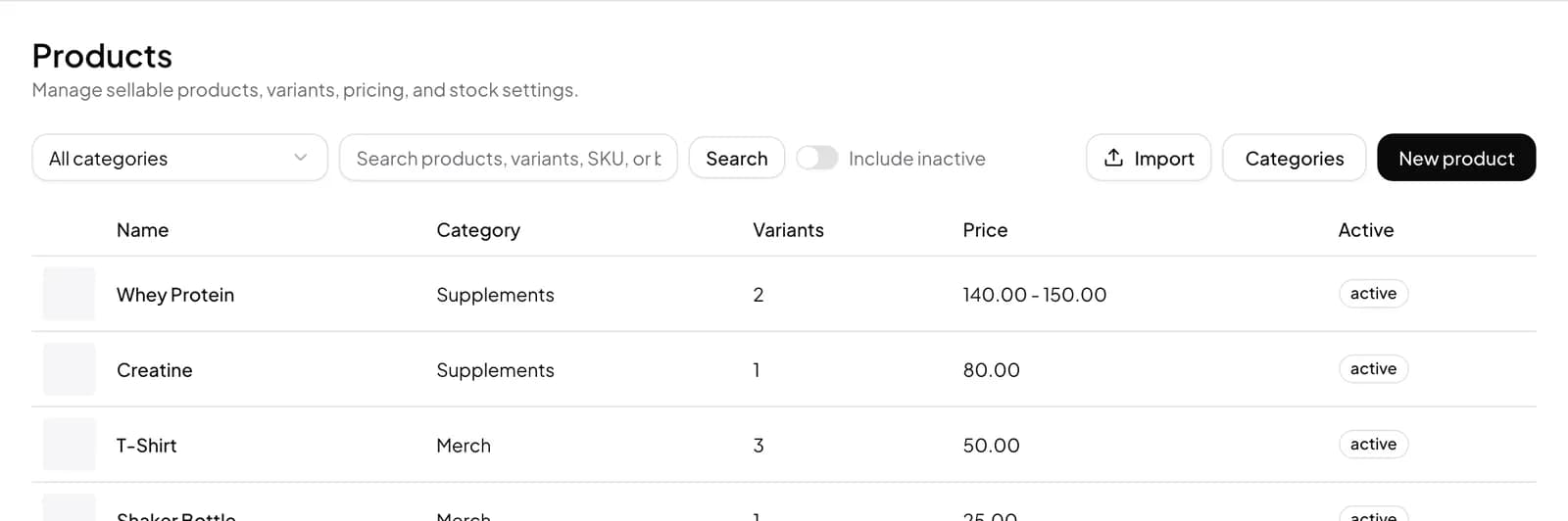
Every product can have variants, and each variant carries its own SKU, barcode, price and cost. The register search finds items by name, SKU or barcode, and the Scan button opens a camera scanner, so the cashier always sells the exact size and colour that leaves the shop.
Give a variant a Member price and it is charged instead of the regular price whenever a member is attached to the sale. If you run more than one store, Location pricing lets one shop charge a different price or hide a variant altogether.
The counter rules are yours to switch on: Refunds at POS lets cashiers refund item by item with a manager approval step, Manual discounts at POS asks for approval on big discounts, and Cash drawer management at POS records paid in, paid out and an end of day Z report.
Set up your shop till
- Pick Retail when you sign up, then open Catalog > Products and add your products.
- On each product, use Add variant for every size or colour, filling in the SKU, barcode, price and cost, and a Member price if members pay less.
- In More features (Settings > Features), switch on the counter tools you want, such as Refunds at POS, Manual discounts at POS and Cash drawer management at POS.
- Open Sales > POS, search or press Scan to add items, and take payment.
- Reprint any receipt later from Sales > Receipts, and check takings in Reports > End of day.
What shoppers see
At the counter the shopper sees a quick checkout: the cashier scans each tag, the right size and price appear on the bill, and a member who gives their name or shows their member QR gets the member price straight away.
They leave with a proper receipt listing every item and variant, which makes exchanges simple: the cashier can look the sale up again instead of guessing what was bought.
Questions
Can I sell sizes and colours separately?
Yes. Each variant has its own SKU, barcode, price and cost, so the till charges and counts the exact one sold.
Does it work with a USB barcode scanner?
Yes. The scanner window accepts a typed or wedge scanned barcode, and the register search also finds items by barcode. On a laptop or tablet you can use the camera instead.
Can members pay a lower price?
Yes. Set a Member price on a variant and it is charged instead of the regular price when a member is attached to the sale.
Can cashiers give refunds without me?
With Refunds at POS on, cashiers refund a completed sale item by item, and the refund goes through a manager approval step.
How do I close the till at night?
Turn on Cash drawer management at POS to record paid in and paid out with reasons, then close with the end of day Z report in the POS shift panel.