One parent login for every child.
Parents add each child once, then book classes, buy packages and get reminders for all of them from their own account.
Why child accounts do not work
A nine year old has no email address and no phone. Centres end up creating fake logins per child, or a parent with three children juggles three accounts and still misses the reminder for the one in Saturday English.
Payments get tangled too: the parent pays, but the lessons have to land on the right child, and the admin spends time matching transfers to names.
How family accounts work
A parent signs in once and adds each child under Family with a full name, an optional date of birth and anything staff should know, such as allergies or pickup arrangements. The child needs no email address or phone number of their own.
When booking, the parent picks who the seat is for and reserves it for that child. When buying, they can buy a plan for a child: the package belongs to that child, while the receipt stays in the parent's name. Packages never mix between siblings.
Reminders go to the parent and keep the child's name on them, so it is obvious which child the class is for. Class messages on WhatsApp go to the parent for each child as well.
Turn on family booking
- Make sure you are on the Advance plan or above, which includes family accounts.
- Create your lesson packages under Catalog > Membership plans so parents have something to buy for each child.
- Send parents your sign up link. They open Family and press Add a family member for each child.
- Staff can see the family links on each student's customer profile.
What parents see
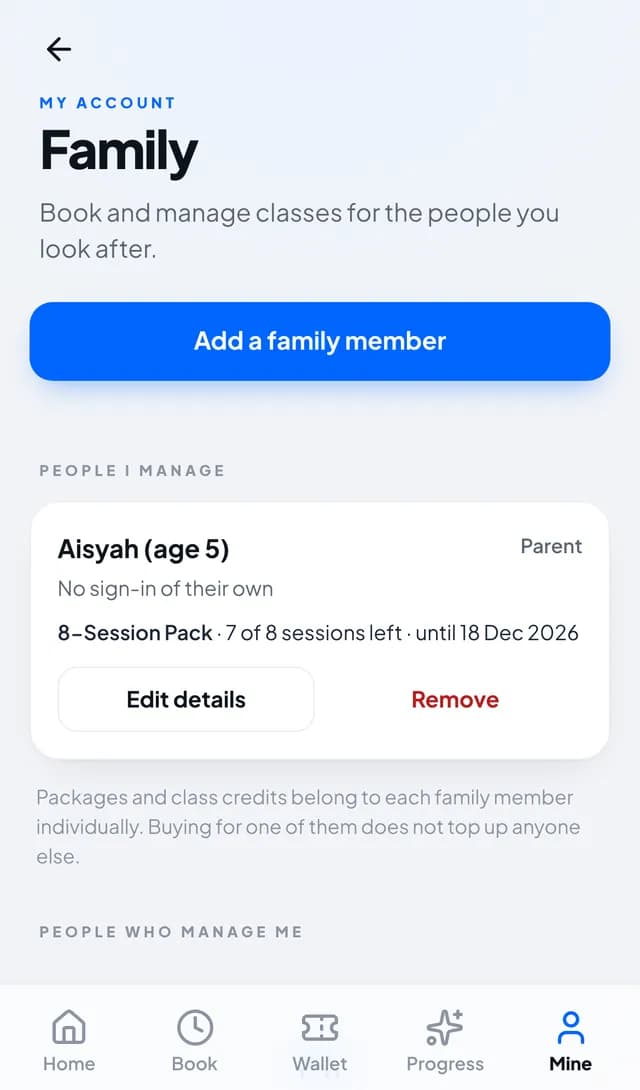
A Family page listing People I manage, with each child's sessions left and the date their package runs to, and Buy a package for them next to any child without one.
When booking a class they choose who it is for, and the confirmation says which child has the seat. The page reminds them that packages and class credits belong to each family member individually.
Questions
Does a child need their own email or phone?
No. Timeo does not ask for a child email address or phone number. Reminders go to the parent.
Can siblings share one lesson package?
By default each package belongs to one child, so buying for one does not top up another. Shared packages are a separate setting per plan on Advance.
Do parents need to install an app?
No. The Family page is part of your member page, which parents open in any phone or computer browser after signing in.
Who receives the class reminders?
The parent, with the child's name on the reminder so it is clear whose class it is.
Which plan do I need?
Advance or Team. Family accounts are not part of Basic.