Sell study hours that count only the time spent inside.
Members buy a pass of hours, the clock starts when they scan in at the door and stops when they scan out, and only the time they actually spent comes off.
Why day passes and stamp cards do not fit a study cafe
A student who comes in for two hours before class should not pay the same as someone who stays from opening to closing, yet a day pass charges them both alike. A paper card with hours written on it depends on staff remembering to note the time in and out, and nobody is at the counter at 11pm.
Without a clock tied to the door, you end up either overcharging light users, who stop coming, or undercharging the regulars who camp all day.
How Timeo runs hours passes
Switch on timed visits and a Time pass becomes a bank of hours. A scan at the door opens a visit and holds the member’s seat; the next scan closes it and takes off only the time spent. A free exit window means someone who walks straight back out within a few minutes is not charged.
You set the limits per pass: Longest single visit caps one sitting, and Max hours per day makes the door refuse entry once a member has used that much today, ending the visit when it is reached.
Members are warned before their time runs out, 15 minutes ahead by default, by push and by WhatsApp from your own number once it is linked. The notice that time is up is always sent.
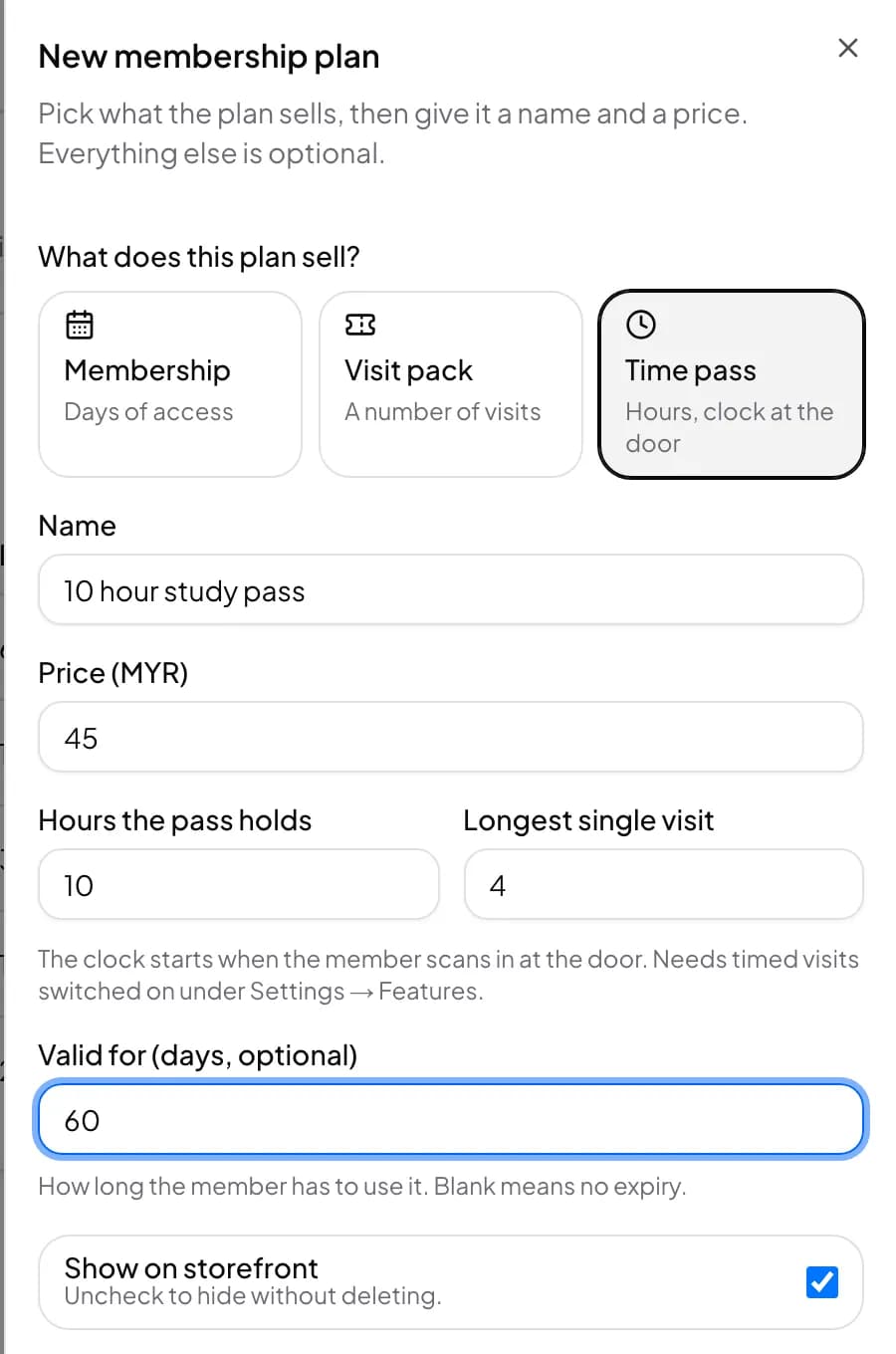
Set up hourly passes
- Pick Gym & Fitness when you sign up: it is the business type that shows the Inside now board and seat reports. Turn off Classes and coaches in More features if you run no classes.
- In More features (Settings > Features), find Timed visits (hours passes), switch on Start a clock at the door, set Warn the member this many minutes before time is up, and press Save.
- Open Members > Membership plans, press New plan and choose Time pass under What does this plan sell?
- Fill in Hours the pass holds, and optionally Longest single visit and Max hours per day, then add the price and save.
- Connect a QR door reader under Door access > Hardware so scans start and stop the clock.
What members see
Members buy a pass in the Timeo app or on your member page. When they scan in, their home screen shows You are inside, the time they started, how long is left on this visit and how much is left on the pass.
If they run out, the app says Your time is up and tells them to scan out at the door or ask the counter to top them up, so nobody is surprised by an extra charge.
Questions
Does the clock keep running when a member steps out?
Scanning out ends the visit and stops the clock. If you turn on Keep the seat when a member steps out, the seat stays theirs and the clock keeps running until their time is up.
Can I limit how long one visit lasts?
Yes. Set Longest single visit on the pass. Max hours per day caps the total across a day.
Will members get a warning before their time ends?
Yes, 15 minutes before by default. You can change it or set 0 to switch the warning off; the time up notice is always sent.
What if someone scans in by mistake and leaves at once?
Free exit within this many minutes of check-in, 5 by default, means a quick exit is not charged and the visit is not counted.
Can I give new members a free trial of a few hours?
Yes. Make a short Time pass and pick it under Free trial for new members in More features. Each person gets it once.