Order from the seat, skip the counter line.
Guests who already have a seat scan the code on the table and order a second coffee or a slice of cake without getting back in line.
The second coffee you never sell
In a cafe the counter is the bottleneck. Guests who have found a seat with a laptop or a friend will happily buy another latte or a pastry, but not if it means queueing behind the takeaway crowd again.
Staff walking the floor to take orders is not an option when there are two people on shift: one on the machine and one on the till.
How table QR works in a cafe
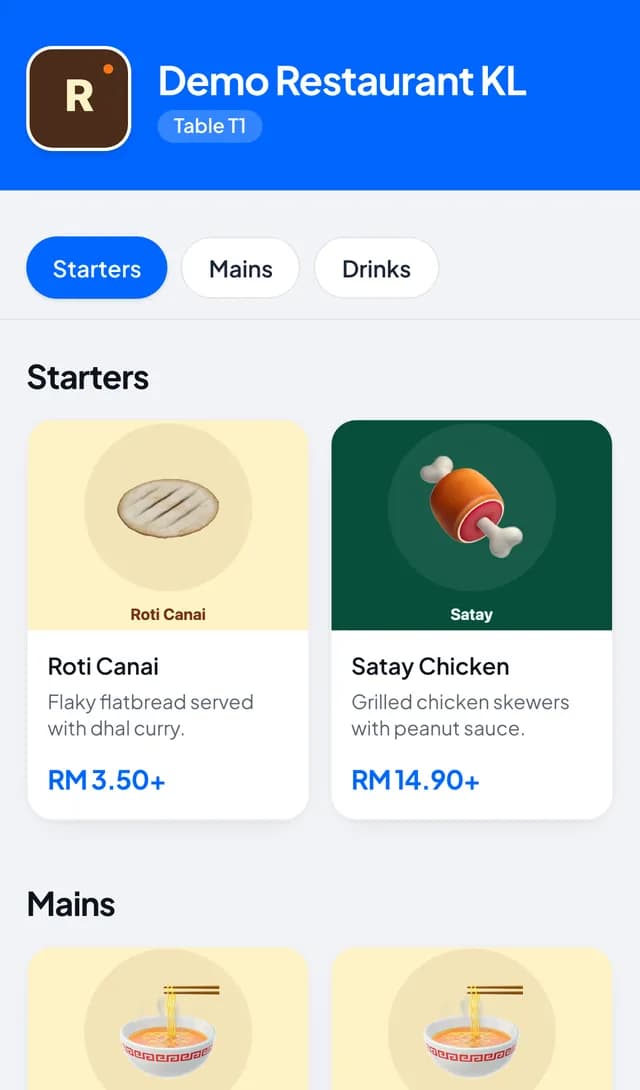
Each table or seating area gets its own QR code from Settings > Tables. Scanning it opens your cafe menu in the guest’s browser, with the same milk, size and sweetness options as your till.
The guest sends the order and it appears on the kitchen screen as a QR order with the table label, so the barista knows where the cup goes. It also sits as an open ticket on that table in the POS.
There is no payment on the phone: guests settle at the counter when they leave, or staff take payment at the table through the POS. For a cafe that wants pay first, keep QR for repeat orders from known regulars and run first orders at the till.
Put codes on your cafe tables
- In Settings > Tables, press New table for each table, bench or counter seat you want to serve.
- Print them with Open printable QR, or Export all QR codes for the whole room.
- Keep Sales > Kitchen open on a screen the barista can see.
- Before taking payment, open the table on Sales > Tables (live) and press Resume to load what it ordered.
What guests see
Guests see your menu with photos, choose their options, and send the order without installing anything or signing up. The page follows the order through Queued for the kitchen, Preparing your order and Ready.
Want another round? Place another order starts a new one from the same table. When they leave, they pay at the counter.
Questions
Do guests need to install an app?
No. The QR opens the menu in the browser, and a name and phone number are optional.
Do guests pay on their phone?
No. QR orders have no payment step. Guests pay at the counter or to staff through the POS.
Can QR orders include drink options?
Yes. The QR menu uses your modifier groups, so milk, size and sweetness choices reach the barista.
How does the barista know which seat ordered?
Every QR ticket on the kitchen screen shows the table label you gave it in Settings > Tables.