QR table ordering that sends orders straight to the kitchen.
Each table gets its own QR code. Diners scan it, order from your menu in the browser, and the kitchen sees the ticket with the table number on it.
Why ordering slows a full dining room
On a busy night a server can only be at one table at a time. Guests sit with closed menus waiting to order, then wait again to add a drink, and every handwritten order is a chance to mishear less ice as no ice.
Second rounds are where the money is, and they are the first thing lost when the floor is short staffed. A table that cannot catch anyone’s eye simply asks for the bill.
How Timeo QR ordering works
You create your tables in Timeo and print a QR code for each one. Scanning it opens your menu on the diner’s phone in the browser. There is no app to install and no account to create: a name and phone number are optional.
Diners choose dishes with the same modifier groups your POS uses, add a note, and press Send to kitchen. The order lands on the kitchen screen marked as a QR order with the table number, and it shows as an open ticket on that table in the POS.
Payment stays with your staff. QR orders have no payment step on the phone: the table pays at the counter or with the server through the POS, so you keep one bill per table and one close at the end of the night.
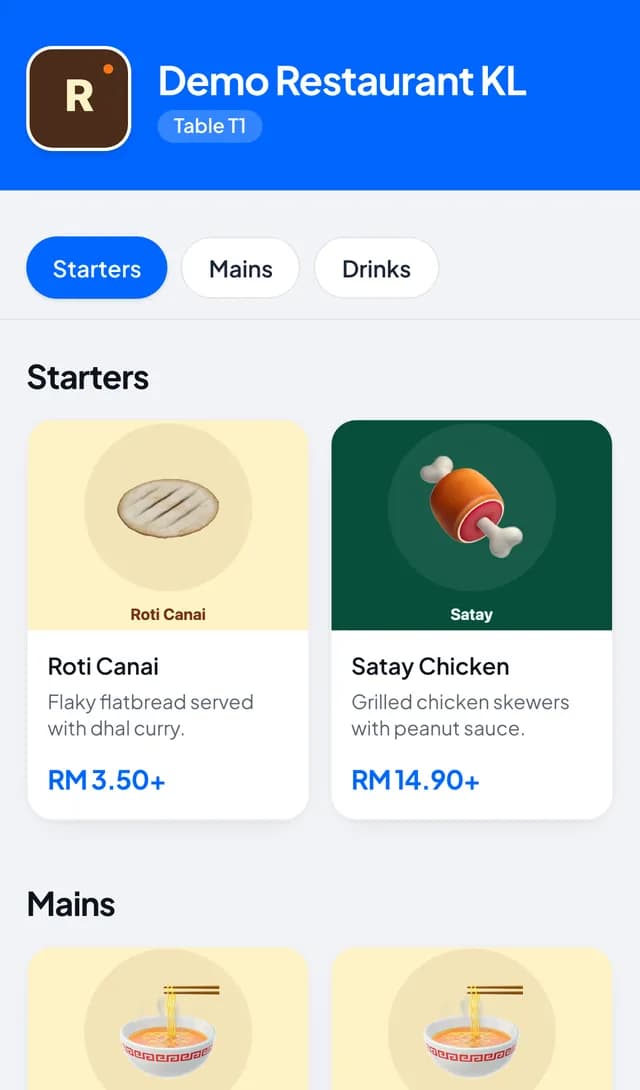
Put QR codes on your tables
- Open Settings > Tables and press New table for every table, using labels your team recognises, for example T1 or Window 3.
- Press Open printable QR for one table, or Export all QR codes to print the whole floor at once.
- Check your dishes have photos and that their options are set under Catalog > Modifier groups.
- Place the codes on the tables. New QR orders appear on Sales > Kitchen and against the table on Sales > Tables (live).
What diners see
The diner sees your menu by category, picks options such as size or spice level, and sends the order. After that the page shows its progress: Queued for the kitchen, Preparing your order, Ready, then Served.
Ordering another round is one tap away with Place another order on the same page. When they are done, they pay your staff as usual.
Questions
Do diners need to download an app?
No. The table QR opens your menu in the phone’s browser, with no sign up. A name and phone number are optional.
Can diners pay from their phone at the table?
Not through the QR menu. QR orders go to the kitchen and onto the table, and the table pays your staff through the POS.
How does the kitchen know which table ordered?
Each ticket on the kitchen screen shows the table and that it came from a QR order, along with every option and note.
Can one table order more than once?
Yes. Every order from that table’s QR is added to the table as an open ticket, and staff see them all together on Sales > Tables (live) before taking payment.
Is this the same menu as the POS?
Yes. QR ordering reads your products and modifier groups, so a price or option change shows up on both at once.