A kitchen display your line cooks can trust.
Tickets from the counter, the servers and the table QR land on one screen, in order, with every note the guest asked for.
What paper dockets cost a kitchen
Paper dockets get wet, fall behind the grill and get read in the wrong order. A no onions note scribbled in the margin is missed on a Saturday, the dish comes back, and the table waits twice.
The pass has no idea which tickets are waiting and which are cooking, so servers walk into the kitchen to ask, and food sits under the lamp because nobody knew it was ready.
How the Timeo kitchen screen works
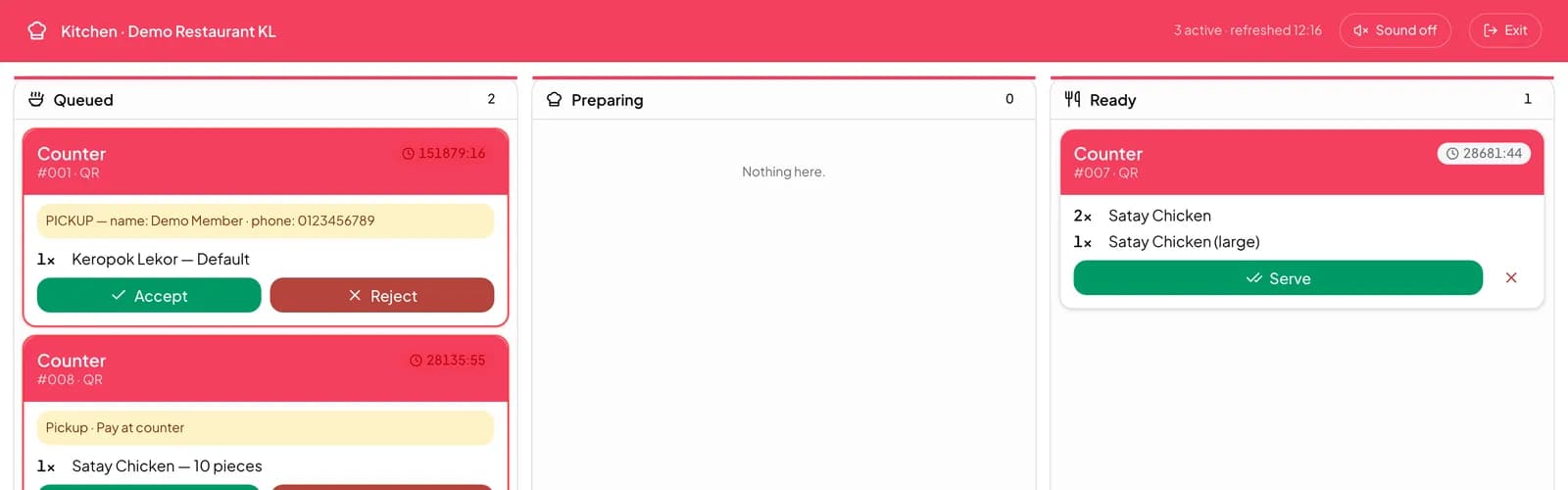
Sales > Kitchen opens a board with three columns: Queued, Preparing and Ready. Each ticket says where it came from, POS, QR or Staff, which table it belongs to, and the notes on each line. A default option the guest removed is called out clearly, so NO onions is hard to miss.
Cooks press Start cooking to take a ticket, Mark ready when it is plated, and Serve once it has left the pass. A whole table can be marked ready or served at once, and a sound plays when a new ticket arrives.
If you use hold and fire, held dishes stay off the board until the server fires them, so the kitchen only cooks what the table is ready for. Any ticket can still be printed if your line prefers paper as well.
Put the kitchen screen on the line
- Check Settings > Printing > Kitchen screen is on. It is on by default.
- Open Sales > Kitchen on a tablet or screen in the kitchen, signed in as a staff member who can manage the kitchen.
- Take a test order from Sales > POS and watch it appear under Queued.
- Show the team the three buttons: Start cooking, Mark ready and Serve.
What guests notice
Dishes come out right the first time, because the cook reads the same option and note the guest chose instead of a server’s handwriting.
Guests who ordered from the table QR can follow their order on their phone as it moves from Queued for the kitchen to Preparing your order and Ready.
Questions
Do we need special kitchen hardware?
No. Sales > Kitchen opens in a browser on any tablet or screen, and TimeoPro also has a kitchen screen on Android.
Does the kitchen see modifiers and notes?
Yes. Line notes show on the ticket, and default options the guest removed are shown with emphasis.
Can we still print tickets?
Yes. Each ticket has a print button, and Sales > Receipts can reprint a kitchen ticket.
What if we only use paper?
Turn off Kitchen screen in Settings > Printing and orders are complete as soon as they are paid.
Can the kitchen hold a course?
Holding is done at the POS: with Hold and fire at POS on, held items stay off the kitchen board until the server fires them.