Takeaway orders online, on your own menu.
Customers order ahead from your menu, you accept the order into the kitchen, and the counter hands it over against a pickup code.
The takeaway problem
Phone orders tie up a server during service and get misheard. Orders sent by chat sit unread while the kitchen is slammed, then a customer turns up for food nobody started.
Delivery apps fill the gap, but every order carries their commission, and the customer belongs to the app rather than to your restaurant.
How Timeo pickup orders work
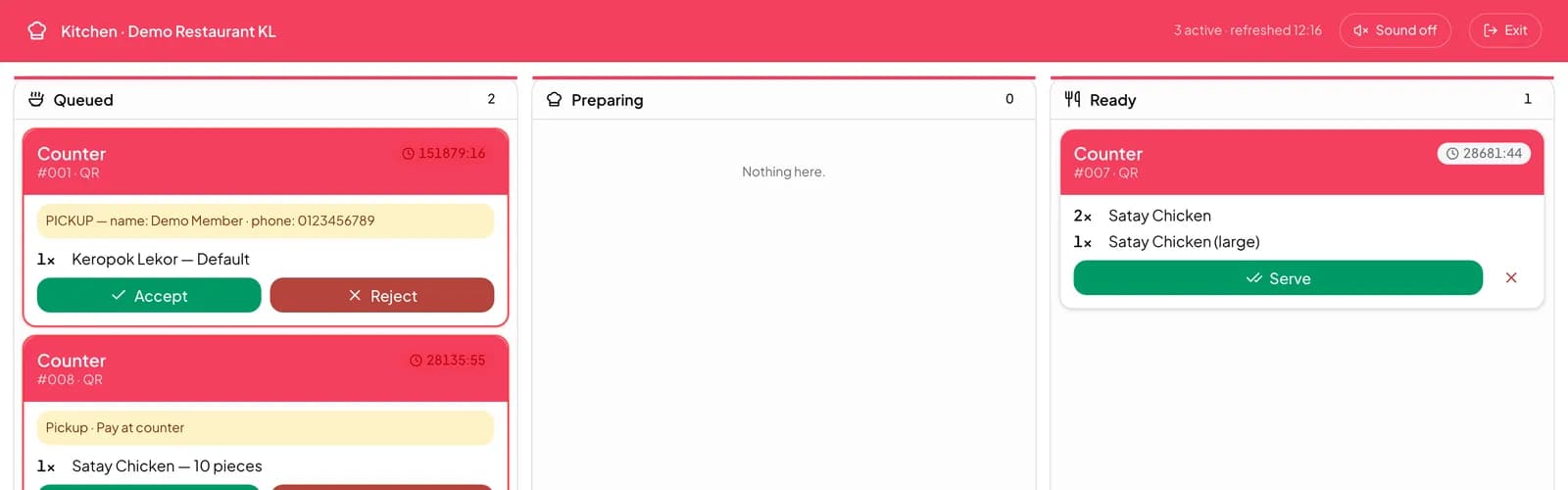
Customers order from your menu on your Timeo page in their browser and choose Pickup. New online orders land in Sales > Incoming orders, where you accept one to send it to the kitchen or reject it.
Sales > Pickup orders shows each order moving through New, Packing, Ready and Collected. At the counter, press Verify pickup and scan the customer’s QR, or type the Pickup code, so the bag goes to the right person.
Depending on how you set up payments, customers pay online, from their wallet, by DuitNow for Malaysian restaurants, or at the counter when they collect. In the POS, online pickups appear as their own order type so they never mix with dine-in tables.
Start taking pickup orders
- Make sure the dishes you sell for takeaway are in Catalog > Products with their options.
- Set up an online payment provider in Settings > Payments if you want customers to pay when they order.
- Watch Sales > Incoming orders during service and accept each new order into the kitchen.
- Hand orders over from Sales > Pickup orders with Verify pickup.
What customers see
Customers pick dishes, add notes such as allergies or spice level, choose pickup and how to pay, and place the order. They can track it from Placed to Preparing and Ready.
At the counter they tap Show pickup code and the staff verify it. Their past orders stay in their account, so the next takeaway starts with Order again.
Questions
Where do customers place pickup orders?
On your Timeo page in their browser, from the same menu and options your POS uses.
Can I refuse an order when the kitchen is full?
Yes. Every online order waits in Sales > Incoming orders until you accept or reject it.
How do we make sure the right person collects?
Use Verify pickup on Sales > Pickup orders to scan the customer’s QR or type their pickup code.
Can customers pay when they collect?
Yes, if you allow it. Customers choose how to pay when they order, including at the counter.