Gym memberships that renew, pause and expire on their own.
Create your plans once, sell them at the desk or in the app, and let Timeo keep track of days, visits, holds and renewals.
Memberships are hard to keep straight
A gym sells monthly plans, annual plans, ten visit packs and day passes, and every one of them has its own end date. Kept in a spreadsheet, somebody forgets a renewal, a member who paid for a year is chased for a month, and a lapsed member keeps training for free.
Then life happens: a member travels for two months or gets injured and asks to pause. Done by hand, the end date is pushed out on paper and the door never hears about it.
Plans that carry their own rules
Each plan says what it sells: a Membership gives days of access, a Visit pack gives a number of visits where each class booking or door entry uses one. Set the length in days for a membership, or how long a pack is valid, and leave it blank for no expiry.
For card payers, switch on Auto-renew by card (Stripe) on a plan that runs in whole months or whole weeks. The member’s card is charged through your own connected Stripe account and the membership extends itself. Members who pay another way renew at the desk or in the app, and the Package expiring automation under Settings > Automations can remind them before a session package runs out.
When a member needs a break, put the membership on hold from their profile. Access stops while it is on hold, and the remaining days come back when you press Resume.
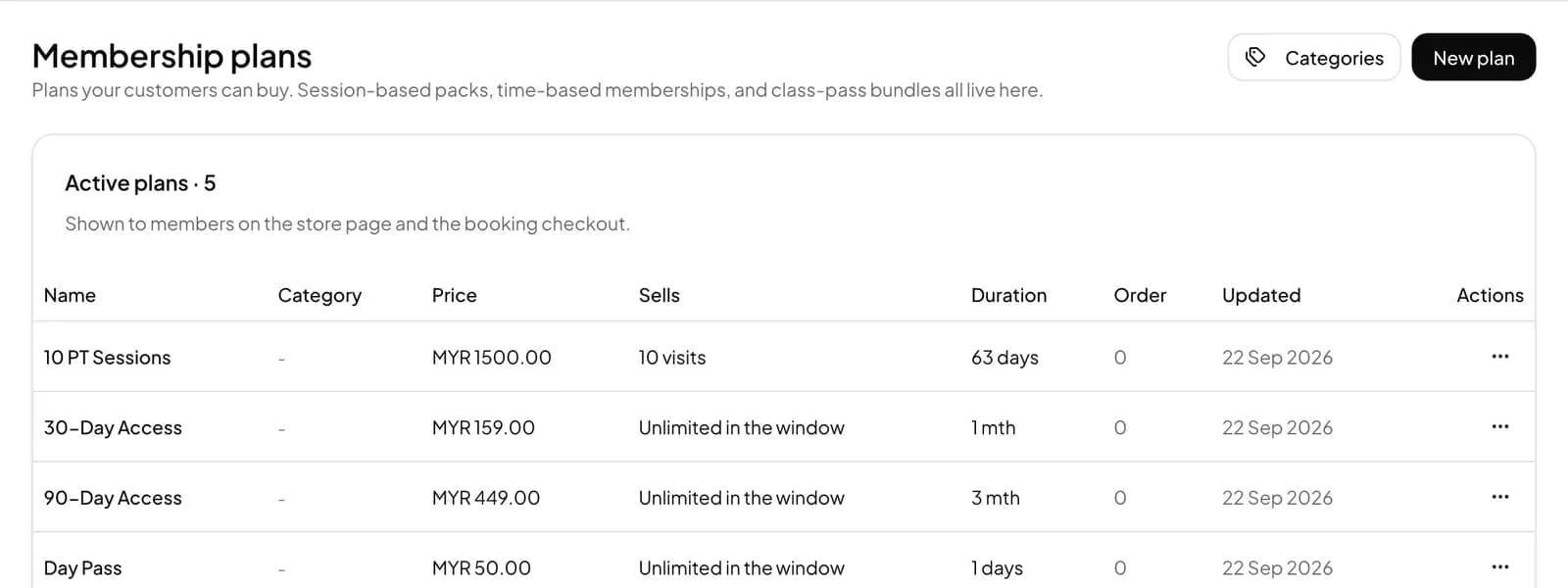
Set up your plans
- Open Members > Membership plans and press New plan.
- Under What does this plan sell?, pick Membership or Visit pack, then add a Name and a Price.
- For a membership, set Length in days, for example 30 for a month or 365 for a year.
- To charge cards automatically, connect Stripe under Settings > Payments, then switch on Auto-renew by card (Stripe) on the plan.
- To pause a member, open their profile, go to Membership holds and press Put a membership on hold.
What members see
Members see their plan, its end date and, for packs, how many sessions are left, in the Timeo app and on your member page. They can buy or renew a plan from their phone with the payment options you have connected.
In Malaysia that can be FPX, DuitNow QR or card through Billplz, iPay88 or Revenue Monster. Elsewhere, one off payments go through your own Airwallex account and automatic renewals through your own Stripe account.
Questions
Can memberships renew automatically?
Yes, by card through your own Stripe account, for plans that run in whole months or whole weeks. Members cancel auto-renew at the front desk.
Can a member freeze their membership?
Yes. Staff put it on hold from the member profile. Access stops while it is on hold and the remaining days return on Resume.
Can I sell visit packs as well as monthly plans?
Yes. A Visit pack holds a number of visits, and each class booking or door entry uses one, depending on how you set it up.
Can I give a member a plan without charging?
Yes. Give plan without payment adds a plan without recording a sale. Use Sell plan when you want to charge.
Can family members share one plan?
On Advance you can switch on Let members share this plan for packs. Time based memberships cannot be shared.